


温馨提示
M电脑Word要勾选运行 Rosetta方法,才能在Word里面显示EndNote,Intel芯片则无需操作
破解教程
1、软件“EndNote 2025”安装包下载完成后,双击安装程序开始安装;
2、一直点击“Next”;
3、出现下图,选择 我有产品密钥(I have a product key)

4、返回安装包,双击注册机,选择2025版,点击Generate生成激活码并复制,如图

5、粘贴激活码到安装进程,点击 下一步(Next)安装

6、输入任意输入 您的姓名(Name) 和 您的组织(Organization)

7、随后一直点击“Next”,完成安装和破解文章源自:知您网(zhiniw.com)知您网-https://www.zhiniw.com/endnote-2025-mac.html
EndNote 大客户授权版怎么导入word 2019/2021 使用呢?【这里参考之前的软件“EndNote 20”,设置方法差不多,因每天时间比较匆忙,这里不重复,请大家多多担待!】
首先关闭word!!!关闭endnote!打开“系统偏好设置”里面的“安全性与隐私”。
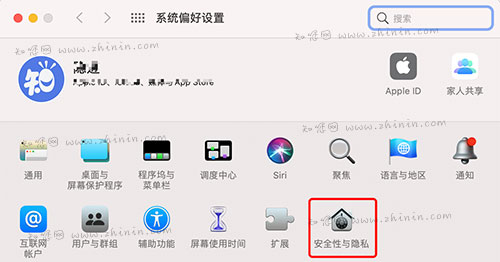
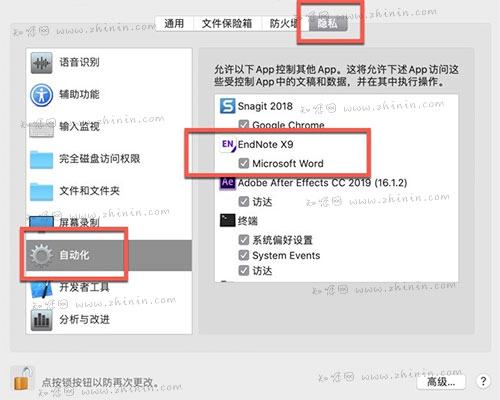
在“隐私”里面的“自动化”勾选endnote 20下面的“Microsoft Word”。如果没有直接跳过这一步!
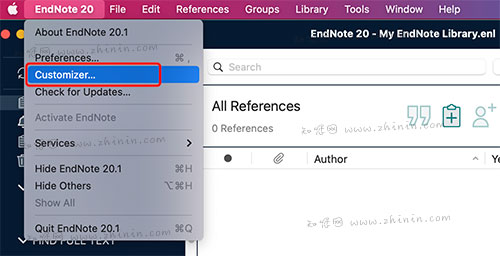
然后打开EndNote 20大客户授权版,在左上角菜单栏里面,选择打开“Customizer…”。
勾选“Cite While You Write”,然后点击“Next”。
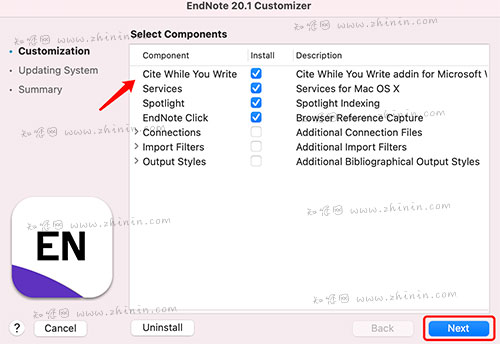
输入密码进行安装

完成后点击“Done”
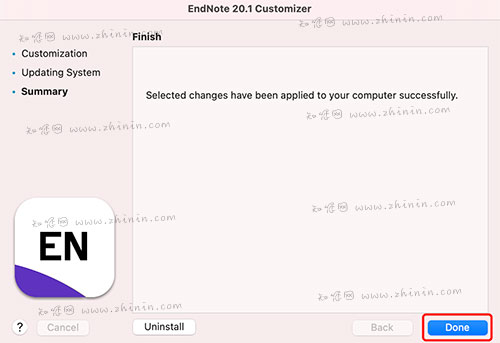
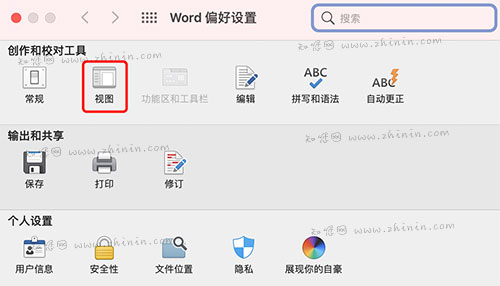
然后打开Word 2019在左上角菜单栏,点击“偏好设置”

选择打开“视图”
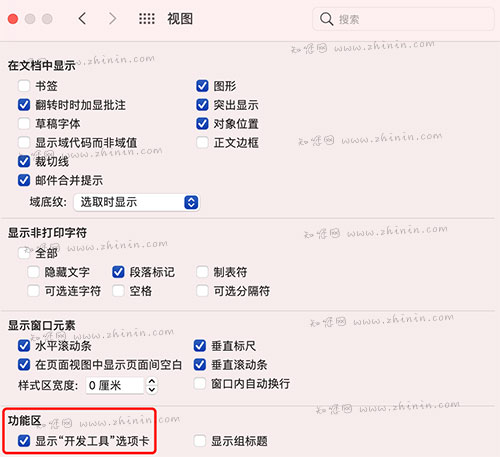
勾选最下面的功能区的【显示“开发工具”选项卡】
打开新建一个文档,显示EndNote 20大客户授权版已经成功导入word 2019!
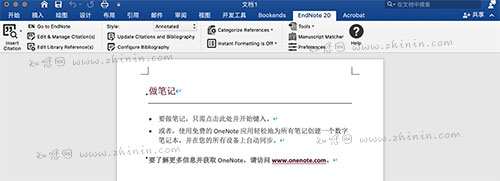
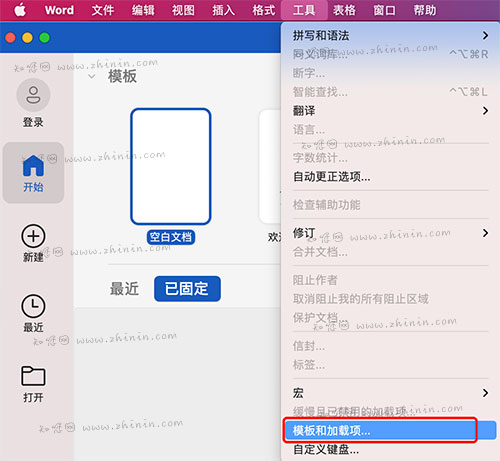
注意!如果没有显示,打开左上角菜单栏的“工具”,打开“模板和加载项…”。
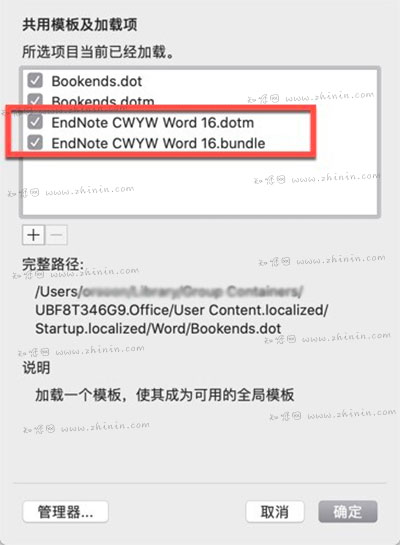
勾选红框内的两条即可!
软件介绍
EndNote 2025 Mac破解版下载是知您网搜集到的Mac os系统上一款专业的文献管理与科研辅助软件,广泛用于学术写作、论文撰写和科研项目资料整理。作为科研人员、学生和写作从业者的重要工具,它帮助用户高效地收集、组织、引用与共享文献资料,支持多种引用格式与学术期刊风格自动生成参考文献列表。Mac 版 EndNote 2025 针对 macOS 界面与性能进行了深度优化,支持 Retina 显示、快捷键操作和文稿编辑器(如 Microsoft Word for Mac)的原生集成,让研究与写作流程更顺畅、整合更自然。
EndNote 2025 for Mac软件功能介绍
一、核心文献管理功能
1、文献收集与整理:
• 支持从Web of Science、PubMed等在线数据库直接检索并导入文献。
• 支持批量导入pdf文件,并自动提取元数据生成题录信息。
• 允许用户创建个人文献库,并通过分组(如智能分组、组合分组)实现多级分类管理。
• 支持对文献进行编辑、查重、排序等操作。
2、文献引用与格式化:
• 提供超过8000种期刊的参考文献格式,用户只需选择目标期刊,即可自动调整参考文献的格式,简化投稿准备过程。
• 支持自定义引文样式,满足不同期刊的投稿要求。
• 内置pdf阅读器支持高亮、下划线、删除线和添加注释等功能,注释内容可被搜索,方便文献的深入阅读和整理。
3、团队协作与共享:
• 支持与EndNote Web同步,实现多设备访问。
• 支持团队协作,最多可与1000位用户共享文献库,并可设置读写权限,满足大型研究团队的协作需求。
二、智能化功能增强
1、AI关键要点提取:
• EndNote 2025搭载生成式AI工具,可自动从论文和PDF中提炼出关键信息,节省研究者大量的阅读与筛选时间。
• 每篇文献的重要内容将被简明总结,极大提升文献初筛效率,帮助用户快速了解一篇文章“值不值得读”。
2、智能期刊推荐:
• 基于机器学习的期刊匹配系统被无缝集成至Cite While You Write插件中。
• 系统将根据论文主题、关键词和结构,推荐最适合投稿的目标期刊,提升论文发表的成功率。
3、PDF高亮引用插入:
• 用户可以直接在PDF文献中高亮一段文字,然后一键将该段落及其引用信息插入到论文中。
• 这大幅简化了引用流程,提高写作效率。
在知您网(zhiniw.com),您免费下载的EndNote 2025 for Mac版,不仅延续了其在文献管理领域的专业优势,更通过 AI 辅助阅读、PDF 智能引用、增强协作 等新特性,显著提升科研工作流效率。无论是撰写学位论文、基金申请书,还是投稿国际期刊,它都是 Mac 用户值得信赖的“科研生产力引擎”。
文章源自:知您网(zhiniw.com)知您网-https://www.zhiniw.com/endnote-2025-mac.html
DESCRIPTION
EndNote 2025 for Mac (cracked version) is a professional reference management and research assistance software collected by Zhiniw.com for the Mac OS system. Widely used in academic writing, thesis composition, and research project data organization, it serves as an essential tool for researchers, students, and writing professionals. It helps users efficiently collect, organize, cite, and share bibliographic materials, supporting multiple citation styles and automatically generating bibliographies formatted for thousands of academic journals. The Mac version of EndNote 2025 is deeply optimized for the macOS interface and performance, supporting Retina displays, keyboard shortcuts, and native integration with word processors like Microsoft Word for Mac, making the research and writing process smoother and more seamlessly integrated.
EndNote 2025 for Mac Software Features
I. Core Reference Management Functions
1. Reference Collection and Organization:
• Supports direct search and import of references from online databases like Web of Science and PubMed.
• Enables batch import of PDF files, automatically extracting metadata to generate citation information.
• Allows users to create personal reference libraries and implement multi-level classification through groups (e.g., smart groups, combined groups).
• Supports operations such as editing references, finding duplicates, and sorting.
2. Citation and Formatting:
• Provides bibliographic styles for over 8,000 journals. Users simply select the target journal for references to be automatically formatted, simplifying manuscript preparation for submission.
• Supports custom citation styles to meet the requirements of different journals.
• The built-in PDF reader supports highlighting, underlining, strikethrough, and adding notes. Note content is searchable, facilitating in-depth reading and organization of literature.
3. Team Collaboration and Sharing:
• Supports synchronization with EndNote Web for access across multiple devices.
• Facilitates team collaboration, allowing reference libraries to be shared with up to 1,000 users with configurable read/write permissions, meeting the needs of large research teams.
II. Enhanced Intelligent Features
1. AI Key Points Extraction:
• EndNote 2025 incorporates a generative AI tool that automatically extracts key information from papers and PDFs, saving researchers significant time on reading and screening.
• Essential content from each reference is concisely summarized, greatly improving initial screening efficiency and helping users quickly determine if an article is "worth reading."
2. Smart Journal Recommendation:
• A machine learning-based journal matching system is seamlessly integrated into the Cite While You Write plugin.
• The system recommends the most suitable target journals for submission based on the paper's topic, keywords, and structure, increasing the success rate of publication.
3. PDF Highlight-to-Citation Insertion:
• Users can directly highlight a passage of text within a PDF and then insert that paragraph along with its citation information into their paper with a single click.
• This significantly streamlines the citation process and improves writing efficiency.
On Zhiniw.com (zhiniw.com), the free download of EndNote 2025 for Mac not only continues its professional strengths in the field of reference management but also significantly enhances research workflow efficiency through new features like AI-assisted reading, smart PDF citation, and enhanced collaboration. Whether writing a dissertation, a grant application, or submitting to an international journal, it is a trustworthy "research productivity engine" for Mac users.
文章源自:知您网(zhiniw.com)知您网-https://www.zhiniw.com/endnote-2025-mac.html
EndNote 2025 Mac软件下载历史版本
| 版本 | 下载 | 备用 | 密码 |
|---|---|---|---|
| 2(Bid 22114) | 立即下载 | 其它下载地址 | ssay |
朋友,您好!
因“网盘”官方改了下载规则,打开页面提示要访问密码,请填入“ agtm ”(记住是:agtm )或 “ ssay ”(记住是:ssay ),给大家带来的不便,深表歉意!
2022.7.5 16.17
------------------------------
本站大部分下载资源收集于网络,只做学习和交流使用,版权归原作者所有。若您需要使用非免费的软件或服务,请购买正版授权并合法使用。本站发布的内容若侵犯到您的权益,请联系站长删除,我们将及时处理。
若下载失效,可以给我留言,小编看到消息,会尽快补链接!谢谢!